Start 30 days free, no card. Full Pro access for a month, then decide. Start free
How to use Firms & Analysts on Tellvest
You follow U.S. public companies and want to see which research firms and analysts show up on those calls, without hunting firm names across separate transcripts every earnings season.
On Tellvest, that map lives under Firms & Analysts: a research firm and analyst tracker for coverage breadth, question patterns, and management response quality. This page walks the live directory. Open the firm table, switch to the Analyst Directory when you want names, read what each column means, then open a firm or analyst and ground the pattern on a company you follow.
Tellvest tracks analyst dynamics across 2,500+ analysts and 180+ firms, built from public earnings transcripts. Prior quarters and the firm and analyst tracker are free to browse. More firms are added as earnings calls are processed.
Strong disclaimer: Tellvest is descriptive analysis for research and informational purposes only. It is not investment advice. Past performance does not predict future results. Challenge % and coverage counts are descriptive signals from public call Q&A, not buy or sell recommendations. Confirm the live Firms page for current rows.
Open Firms & Analysts
View Analyst Directory
Browse companies
See the Economic Sentiment Index
Why firm and analyst context is hard to track by hand
Firm and analyst activity is scattered across earnings calls. Coverage breadth, question totals, focus areas, and who pressed on a name are hard to compare in one place.
You can feel unsure whether you are missing the desks that cover the companies you follow, and overloaded when you try to rebuild that list call by call.
You should not need to track every sell-side desk by hand to see who covers the names you follow and how they show up in Q&A.
What Firms & Analysts is on Tellvest
In the primary nav, the surface is labeled Firms & Analysts. The live page title is Research Firms & Analysts. Tellvest describes it as a Wall Street research firm and analyst tracker for coverage breadth, question patterns, and management response quality.
Two views share the same product:
| View | URL | What you get |
|---|---|---|
| Research Firms | /firms | Firm directory. Subhead: coverage breadth and question patterns by firm. |
| Analyst Directory | /firms?view=analysts | Person-level directory. Subhead: how analysts question management, and how management responds. |
Use Firms when you want desk-level coverage and question patterns. Use Analysts when you want the people behind those desks. For a score-first path into the same research family, see How to follow earnings without reading every transcript and How to browse earnings scores without Pro. Product context also lives on About.
How to use it in under a minute
Open the directory. Switch firm or analyst. Ground it on a company you follow.
- Open Firms & Analysts. Go to Firms. Scan the Research Firms table: Firm, Analysts, Coverage, Questions, Challenge, Focus Areas. Filter by sector and challenge band (Any / High 15%+ / Mid 8-14% / Low under 8%). Sort by Name, Analysts, Questions, Coverage, or Challenge. Page through the list. The footer notes that more firms are added as earnings calls are processed.
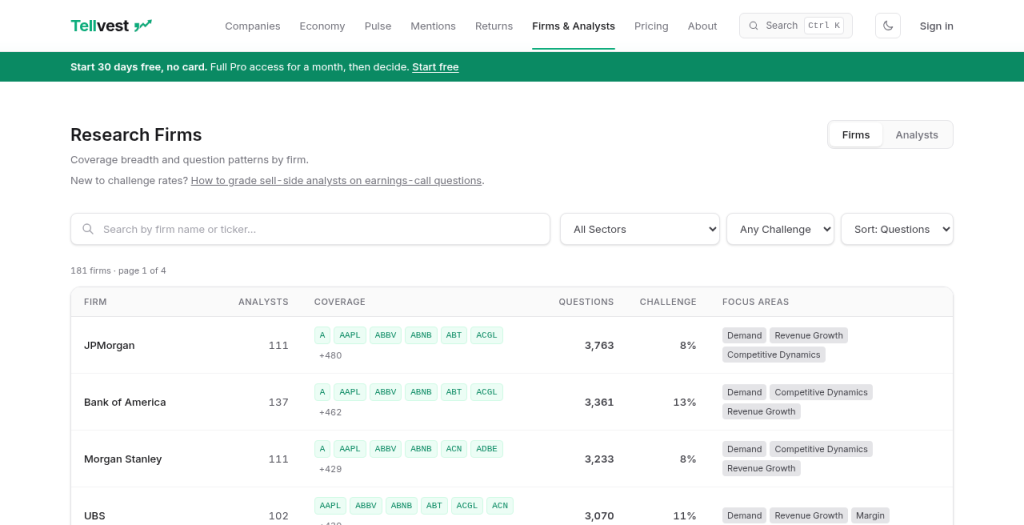
Live Research Firms table: filters, columns, and firm rows. Confirm the live page for current rows. - Switch to Analysts when you want names. Use the Firms | Analysts control, or open Analyst Directory. Person-level rows show Analyst, Firm, Coverage, Questions, Challenge, and Focus Areas. Filter by sector or firm, and jump A-Z.
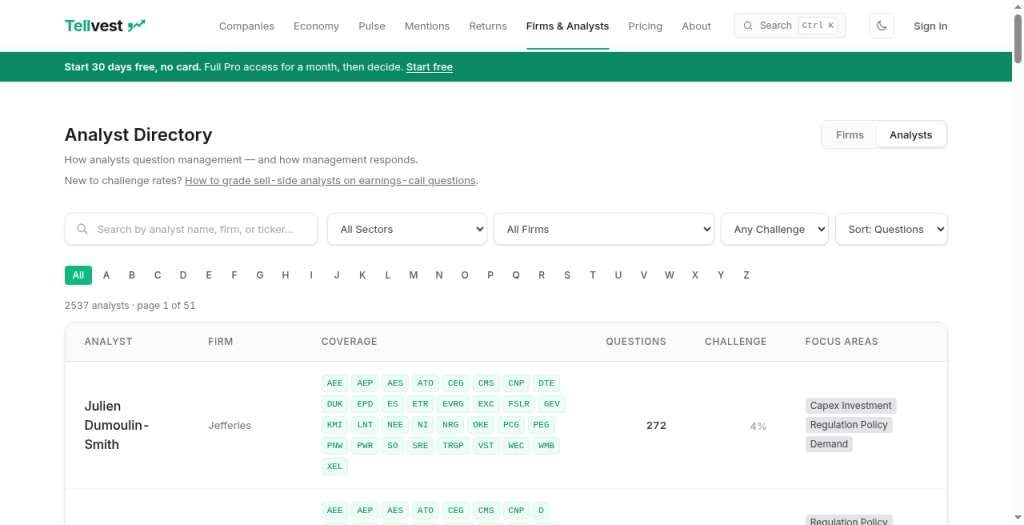
Live Analyst Directory: person-level rows with firm, coverage, questions, challenge, and focus areas. - Open a row, then ground it on a company you follow. Open a firm (for example JPMorgan) or an analyst (for example Julien Dumoulin-Smith at Jefferies) for depth. Then open a company you follow from Companies or a company page, including Analyst Q&A on a free prior quarter when you want call-level context. Keep that step short: this page is the directory walkthrough, not a second Q&A tutorial. For reading one company score, see How to read a company earnings-call score.
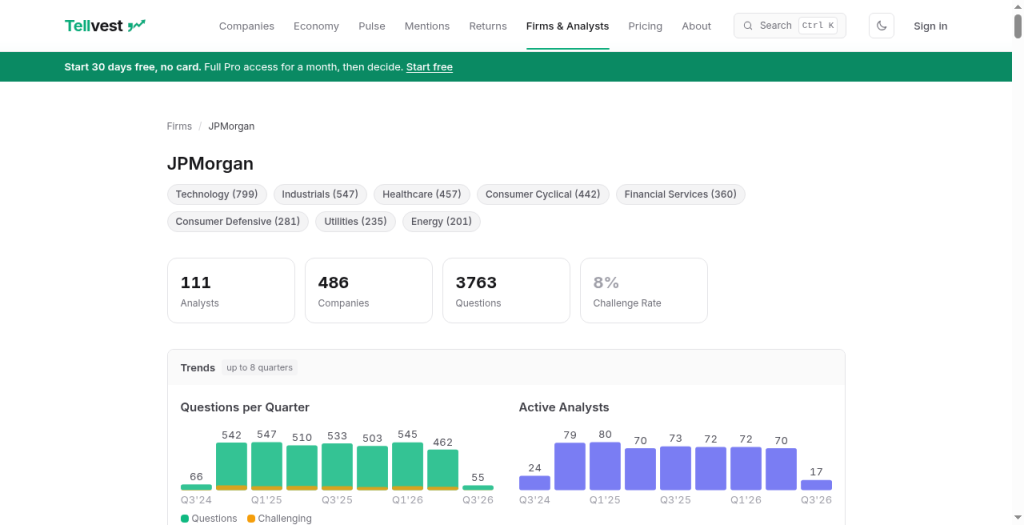
Example firm profile (JPMorgan): sectors, coverage stats, and trends. Confirm the live page for current numbers.
Open Firms & Analysts
View Analyst Directory
Open a firm (JPMorgan example)
What the table columns mean
These are the live table labels. Rows change as calls process. Use the live directory for current numbers; do not treat any snapshot row as a permanent claim.
| Column | Plain meaning |
|---|---|
| Firm / Analyst | The research firm name, or the analyst name (Analyst Directory). |
| Analysts (Firms view) | How many analysts Tellvest tracks for that firm. |
| Firm (Analysts view) | The desk the analyst sits on. |
| Coverage | Companies that firm or analyst appears against in the tracker (ticker chips and counts on the live table). |
| Questions | Question totals Tellvest has recorded for that firm or analyst in the tracker. |
| Challenge | Percentage of questions scored as challenging: where the analyst pushed back, pressed for specifics, or questioned management’s assumptions. (Live tooltip wording on /firms.) |
| Focus Areas | Topic chips such as Demand, Revenue Growth, Competitive Dynamics, Margin, and peers, drawn from how questions are tagged. |
New to challenge rates? See How to grade sell-side analysts on earnings-call questions for the full definition and walkthrough. This page stays on the directory.
Where to go next
From a firm row, open the firm profile for sector chips, Analysts / Companies / Questions / Challenge Rate, trends, and the analyst table (with links into analyst and company pages).
From an analyst row, open the analyst profile for firm link, sector chips, Companies / Questions / Challenge Rate, focus areas, challenge by company, quarterly trends, and Question History with transcript links.
When you want company-level scores next to that sell-side map, Browse companies. Optional market backdrop: See the Economic Sentiment Index. Related product language: Earnings call intelligence and How to get an earnings-call sentiment score.
Browse companies
Open Firms & Analysts
See the Economic Sentiment Index
Frequently asked questions
What is Firms & Analysts on Tellvest?
Firms & Analysts is Tellvest's research firm and analyst tracker. It surfaces coverage breadth, question patterns, and management response quality from public earnings-call Q&A so you can browse desks and people in one place instead of rebuilding the map from transcripts.
How do I switch between Firms and the Analyst Directory?
On Firms, use the Firms and Analysts controls. Analysts opens the Analyst Directory at /firms?view=analysts. Same product, firm-level or person-level rows.
What do Coverage, Questions, Challenge %, and Focus Areas mean in the table?
Coverage is the companies tied to that firm or analyst in the tracker. Questions is the question total recorded for that row. Challenge is the share of questions scored as challenging (pushback, pressed specifics, or questioned assumptions). Focus Areas are topic tags such as Demand or Revenue Growth. See the column table on this page for the live tooltip wording on Challenge.
Do I need an account to browse the firm and analyst tracker?
No. Prior quarters and the analyst and firm tracker are free to browse. See About for the published free layer. Newest-quarter company extras and Pro details stay on Pricing and sibling how-tos.
Where do I go to understand challenge rate in depth?
This page is the directory walkthrough. For challenge-rate definition and how to read it on company Q&A, use the Challenge column section above and the product language on About.
How do I connect a firm or analyst row to a company I follow?
Open the firm or analyst profile from the table, then follow company links from that profile, or start from Companies / a company page and use Analyst Q&A on a free prior quarter when you want call-level context. Pair with How to read a company earnings-call score when the score is the next question.
Is this investment advice?
No. Tellvest publishes descriptive analysis of public earnings materials for research and informational purposes only. It is not investment advice.
Related reads
Tellvest provides descriptive analysis built from SEC filings and public earnings transcripts. Not investment advice.