Start 30 days free, no card. Full Pro access for a month, then decide. Start free
How to get a 1–10 sentiment score for a company’s earnings call
You follow U.S. public companies. You want a clear 1–10 read on a call this quarter, without living in the transcript.
Tellvest reads public U.S. earnings transcripts and SEC filings and gives each quarter a 1–10 earnings-call sentiment score. A score of 1 is a weak quarter. A score of 10 is a strong one. The rubric is published on Tellvest. It is not a black-box opinion score.
Tellvest is descriptive analysis for research only. It is not investment advice.
How to get a score in under a minute
- Open Tellvest or go straight to Browse companies.
- Open a company page (for example Apple Inc. (AAPL)).
- Read the free prior-quarter score on that page. No account is required to browse prior quarters.
- Create a free account if you want 30 days of full Pro with no credit card, including the newest quarter on company, economy, sector, industry, and Mentions pages.
Free example: As of FY2026 Q2, the Tellvest earnings-call sentiment score for Apple Inc. (AAPL) is 8/10, unchanged from the prior quarter. That score comes from Apple’s FY2026 Q2 earnings call. The newest quarter on that page is part of Tellvest Pro.
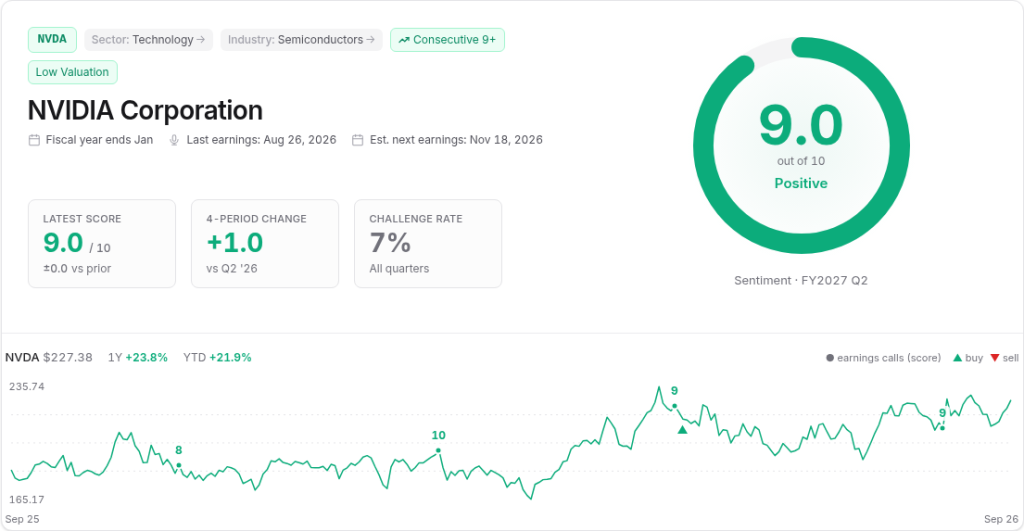
What the 1–10 score is made of
Every score is the sum of four components:
base score + transcript adjustment + EPS adjustment + guidance adjustment
Full detail lives on About. The short version:
Base score from GAAP revenue growth (YoY)
Tellvest starts from year-over-year GAAP revenue growth from SEC filings and looks up a fixed base score:
- 15% or more → 8
- 8% to 15% → 7
- 3% to 8% → 6
- −0.5% to 3% → 5
- −5% to −0.5% → 4
- −15% to −5% → 3
- below −15% → 2
Transcript adjustment
A ±1 Tier 1 adjustment can apply when a single-quarter event (impairment, acquisition, FX swing, divestiture) makes GAAP revenue unrepresentative. A larger ±2 Tier 2 adjustment is reserved for sectors where GAAP revenue is structurally the wrong metric. That list is closed and maintained internally. Illustrative examples on the site include energy, banks, and P&C insurers.
EPS adjustment
If EPS outruns revenue by 5 percentage points or more, the score gets +1 (margin expansion). If EPS trails revenue by 5pp or more, the score gets −1 (margin compression). Inside ±5pp, EPS is neutral.
Guidance adjustment
A raise of 3% or more at the midpoint is +2. A smaller raise (or new annual-cycle guidance introduced for the first time) is +1. Maintain is neutral. A small cut is −1. A cut of 3% or more is −2. Withdrawing guidance entirely is −3.
Hard caps
Even after adjustments, Tellvest applies ceilings:
- Majority of themes are negative or mixed → max final score 6
- GAAP revenue declined year-over-year → max 7
- Forward guidance was lowered → max 7
- One or more themes are negative → max 9
All data is sourced from SEC filings, company-reported results, and public earnings transcripts. Quoted passages on Tellvest are exact substrings of the source transcript.
Free vs Pro (so you know what you are looking at)
Earlier quarters are free to browse. The current quarter, and any newer one, is part of Pro.
- Free: Earnings Pulse, including the latest report; every company quarter before the newest one, plus Economy, sector, industry, and Mentions quarters before the one each page treats as current; company list with sentiment scores and trends; analyst and firm tracker. No account needed to browse.
- Tellvest Pro ($12/month): the latest quarter on company, economy, sector, industry, and Mentions pages, macro signal and theme screener, pre-earnings briefs, live trade signals and signal history, watchlist email alerts, and coverage requests.
- Trial: every new account starts with 30 days of full Pro, free, no credit card required. When it ends, keep Pro for $12/month or stay on the free tier.
Details: Pricing.
What else the score connects to
Once you have a company score, you can compare it to the market-wide Earnings Pulse, browse Mentions, or read the longer product overview at Earnings-call intelligence. For analyst challenge rates on the same calls, see How to grade sell-side analysts on earnings-call questions, or How to follow earnings without reading every transcript. For cross-company Mentions, see How to read cross-company mentions on earnings calls. To browse free prior-quarter scores without Pro, see How to browse earnings-call scores without Pro, How to read Tellvest Post-Earnings Returns: Score Streak Backtest. For the market-wide Economic Sentiment Index on Economy, see How to read Tellvest’s Economic Sentiment Index. To walk a company page score with a live NVDA example, see How to read a company earnings-call score. For the Firms & Analysts directory walkthrough, see How to use Firms & Analysts. New to earnings calls? Start with what is an earnings call.
To get a Tellvest sentiment score for a company’s earnings call: open the company page, read the free prior-quarter 1–10 score, and use the published rubric on About if you want to see how that number is built. Browse companies (start with AAPL), or see How to browse earnings-call scores without Pro.
Tellvest provides descriptive analysis built from SEC filings and public earnings transcripts. Not investment advice.